Around The Globe ATG.WORLD

Visit our sister website :

http://www.atg.world/

This is a social network for enthusiasts just like us. No Junk! Only meaningful conversations with the people who share the same enthusiasm as us.

Around The Globe ATG.WORLD

Visit our sister website :

http://www.atg.world/

This is a social network for enthusiasts just like us. No Junk! Only meaningful conversations with the people who share the same enthusiasm as us.
Showing posts with label TCP/IP. Show all posts

Thursday, August 27, 2009

Ping

Ping is a basic Internet program that allows a user to verify that a particular IP address exists and can accept requests.

Ping is used diagnostically to ensure that a host computer the user is trying to reach is actually operating. Ping works by sending an Internet Control Message Protocol (ICMP) Echo Request to a specified interface on the network and waiting for a reply. Ping can be used for troubleshooting to test connectivity and determine response time.

To find out the IP address for a given domain name e.g. en.wikipedia.org, Windows users can go to their command prompt screen (start/run/cmd) or use an external ping utility and enter
ping en.wikipedia.org
The following result was obtained from pinging en.wikipedia.org from Windows cmd.
Pinging rr.pmtpa.wikimedia.org [208.80.152.2] with 32 bytes of data:
Reply from 208.80.152.2: bytes=32 time=80ms TTL=53
Reply from 208.80.152.2: bytes=32 time=81ms TTL=53
Reply from 208.80.152.2: bytes=32 time=84ms TTL=53

Ping statistics for 208.80.152.2:
Packets: Sent = 4, Received = 4, Lost = 0 (0% loss),
Approximate round trip times in milli-seconds:
Minimum = 80ms, Maximum = 84ms, Average = 82ms
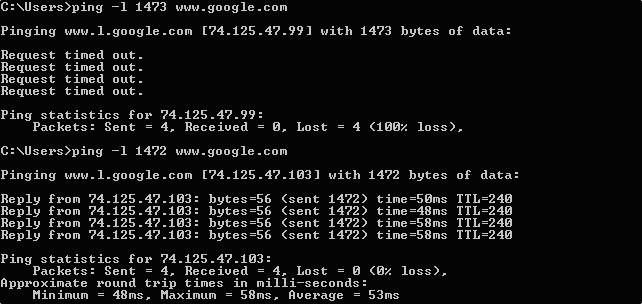
Ping deny.png
Fig. PING DENY A server denying a ping request because of the request's size.

Wednesday, August 12, 2009

Internet Control Message Protocol (ICMP)


Fig. ICMP Header. Click to enlarge
The Internet Control Message Protocol goals and features were outlined in RFC 792 as a way to provide a means to send error messages for non-transient error conditions, and to provide a way to probe the network in order to determine general characteristics about the network.

A more accurate definition of the Internet Control Message Protocol goals and features might be that it is used for two types of operations:
  • When a router or a destination host need to inform the source host about errors in a datagram processing, and
  • For probing the network with request & reply messages in order to determine general characteristics about the network.
The ICMP protocol has two types of operations; therefore its messages are also divided to two:
  • ICMP Error Messages
  • ICMP Query Messages
The Internet Assigned Numbers Authority (IANA) has a list defining the ICMP message types that are currently registered. It also lists the RFC that defines the ICMP message. The list is available at: http://www.isi.edu/in-notes/iana/assignments/icmp-parameters.

Tuesday, August 11, 2009

Sequence Numbers

Sequence Number
  • TCP provides a full duplex reliable stream connection between two end computers.
  • Data is packeted into a number of data packets and every byte that is sent by a host is marked with a sequence number and is acknowledged by the receiver using this sequence number.
  • Sequence numbers are a 32-bit counter, which means the value can be any of over 4 billion possible combinations.
  • Sequence numbers ensure that the receiving machine re-assembles the data packets in the same order to obtain the original data as they were dis-assembled at the transmitting end.
  • The sequence number for the first byte sent is computed during the connection opening.
  • If a computer opens a new connection in addition to an existing connection, the initial sequence number for two different sessions are different.
  • When the TCP sequence is predictable, an attacker can send packets that are forged to appear to come from a trusted computer using the sequence number used by the victim computer.
  • Pseudo-random number generators (PRNGs) introduced some randomness when producing ISNs used in TCP connections, thereby, making ISNs harder to guess, but were still vulnerable to statistical attack

Threat

If a sequence number within the receive window is known, an attacker can inject data into the session stream or choose to terminate the connection. If the attacker knows the initial sequence number, he can send a simple packet to inject data or kill the session if he is aware of the number of bytes transmitted in the session this far.


INITIAL SEQUENCE NUMBERFig. INITIAL SEQUENCE NUMBER. Click to magnify.

Friday, August 7, 2009

IPv4 - Security ??

This post merely tries to explain the security issues and attacks involved in the use of IPv4 standard wrt SESSION HIJACKING
  • The original IPv4 standard needed to address three basic security issues - authentication, integrity and privacy.
  • Authentication was an issue because an attacker could easily spoof an IP address and exploit a session.
  • Spoofing was not restricted to IP address alone, but also extended to MAC addresses in ARP spoofing.
  • An attacker sniffing on a network could sniff packets and carry out simple attacks such as change, delete, reroute, add, forge or divert data. Perhaps the most popular among these attacks is the Man-In-the-Middle attack.
  • An attacker can grab unencrypted traffic from a victim's network-based TCP application, further tampering with the authenticity and integrity of the data before forwarding it on to the unsuspecting target.

TCP/IP - Layered Architecture

The Transmission Control Protocol/Internet Protocol (TCP/IP) model describes a set of general design guidelines and implementations of specific networking protocols to enable computers to communicate over a network. Layers in the TCP/IP model :

* 1 Network Interface (Physical) Layer : The layer is used to move packets between the Internet Layer interfaces of two different hosts over a physical medium such as a fiber cable or a wire.
* 2 Internet Layer : Internet Protocol performs two basic functions:
  • Host addressing and identification: Each host is assigned a valid Internet Protocol Address which is 32-bits long such as 202.144.216.219
  • Packet routing: This is the basic task of getting packets of data (datagrams) from source to destination by sending them to the next network node (router) closer to the final destination.
* 3 Transport Layer : The layer's responsibilities include end-to-end message transfer capabilities independent of the underlying network, along with error control, flow control, congestion control (avoiding huge data on a particular single route/channel), and application addressing (port numbers).
* 4 Application Layer : The Application Layer refers to the higher-level protocols used by most applications for network communication. Examples of application layer protocols include the File Transfer Protocol (FTP) and the Hyper Text Transmission Protocol (HTTP).

TCP/IP LAYERS


ENCAPSULATION :

  • In TCP/IP, as data is being sent from one computer, it will pass from the top layer to the bottom.
  • On the receiving end, the data will then be rebuilt from the bottom layer to the top. You can view an example of this process below.
  • Each layer a packet of information travels through adds what is called a header. Each layer a sending packet passes through gains another header.
  • When the packet is being rebuilt on the receiving end, each header is unpackaged the same way.
EXAMPLE :
  • Your browser works at the application layer and accepts the initial datagram, say a web page to be sent across the Internet and adds the appropriate header describing the protocol used.
  • The transport layer protocol and the appropriate protocol header is added to the datagram. This controls many of the aspects in the management and initiation of communication between the two hosts.
  • In the network layer, routers offer the functionality for the datagram to hop from source to the destination, one hop at a time. This also sees the IP header being added to the datagram.
  • The physical layer is responsible for the delivery of signals from the source to the destination over a physical communication platform, which in this case is the Ethernet, and the header describing the Ethernet Protocol information is added to the Data Unit.

tcp-ip-encapsulation

Putting it All Together - The Data Encapsulation Process

  • 1. One computer requests to send data to another over a network.
  • 2. The data message flows through the Application Layer by using a TCP or UDP port to pass onto the internet layer.
  • 3. The data segment obtains logical addressing at the Internet Layer via the IP protocol, and the data is then encapsulated into a datagram.
  • 4. The datagram enters the Network Access Layer, where software will interface with the physical network. A data frame encapsulates the datagram for entry onto the physical network. At the end of the process, the frame is converted to a stream of bits that is then transmitted to the receiving computer.
  • 5. The receiving computer removes the frame, and passes the packet onto the Internet Layer. The Internet Layer will then remove the header information and send the data to the Transport layer. Likewise, the Transport layer removes header information and passes data to the final layer. At this final layer the data is whole again, and can be read by the receiving computer if no errors are present.

And there you have it: encapsulation at its finest.

Monday, June 29, 2009

TCP Ports

  • A port is a number between 1 and 65,535, and port number references are usually specific to an application.
  • Network makes the use of ports which are basically numbers to distinguish between which data packet is received by which application.
  • A list of well known, registered, and dynamic port numbers is maintained by the Internet Assigned Numbers Authority (IANA) at this location:
  • http://www.iana.org/assignments/port-numbers

Wednesday, June 24, 2009

Transmission Control Protocol [TCP]

The Transmission Control Protocol/Internet Protocol (TCP/IP) model, describes a set of general design guidelines and implementations of specific networking protocols to enable computers to communicate over a network. TCP/IP provides end-to-end connectivity specifying how data should be formatted, addressed, transmitted, routed and received at the destination.

TCP is a very needy protocol. When a frame with TCP data is sent across the network to another station, the sending station must receive an acknowledgement that the data was received properly. If the sending station doesn't receive an acknowledgement after a certain time period, the data is resent in the hopes that it will make it through the second time. This process continues until either the data makes it through, or the transmission process times out.

TCP doesn't need to know how to traverse the network because it relies on IP to get the data to the other side. Once the data makes the trip across the network, TCP takes over and uses its port numbers to determine where to drop the package. It's possible that IP could properly route the data across the network and TCP would try to drop the data at the specified port, but the receiving station may not be listening on that port. The TCP data would have nowhere to go and the entire packet would be discarded.


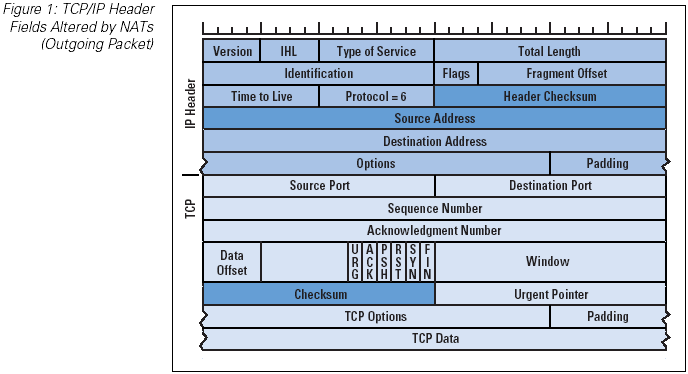
Fig. TRANSMISSION CONTROL PROTOCOL STRUCTURE. Click to Enlarge

Learn about TCP/IP Layered Structure - How TCP works?


THE TCP/IP 3-WAY HANDSHAKE
This handshake is often referred to as the "three way handshake" because of the three frames that pass back and forth:


The First Frame – The initial synchronize (SYN) frame is sent from the station initiating the conversation to the destination station. The SYN frame includes initial sequence numbers and the port that will be used for the conversation, as well as other initialization parameters.

The Second Frame – The destination station receives the SYN frame. If everything is in agreement, it sends an acknowledgement to the SYN (called an ACK) and its own SYN parameters.

The Third Frame – The original station receives the ACK to its original SYN, as well as the SYN from the destination device. Assuming everything is in order, the source station sends an ACK to the destination station's SYN.